Overview
This documentation explains how to set up TradingView alerts to work with the MT5 Bridge. The system allows you to execute trades directly from TradingView alerts to your MetaTrader 5 platform.
How It Works
- Create a strategy or indicator in TradingView
- Set up alerts with webhook URLs
- TradingView sends HTTP POST requests to our webhook
- The bridge processes the request and sends commands to MT5
- MT5 executes the trades based on your strategy
Key Features
Fast Execution
Execute trades directly from TradingView alerts to your MT5 platform in milliseconds.
Secure Connection
API key authentication ensures only authorized signals are processed by your account.
Multiple Order Types
Support for market, limit, stop orders with stop loss and take profit parameters.
Magic Number Filtering
Use magic numbers to identify and manage specific groups of orders efficiently.
Webhook Setup in TradingView
Get Your Webhook URL
Your webhook URL is available in the client portal. It looks like this:
https://www.connect-tradingview/tradingview-webhook.php?api_key=YOUR_API_KEYCreate an Alert in TradingView
-
Go to your TradingView chart
-
Create an alert on your indicator or strategy
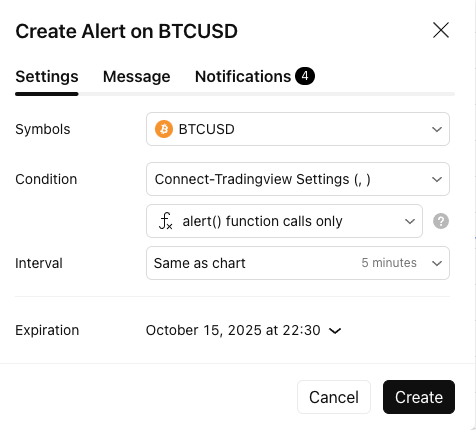
Creating an alert in TradingView
-
In the alert settings, select "Webhook URL"
-
Paste your webhook URL
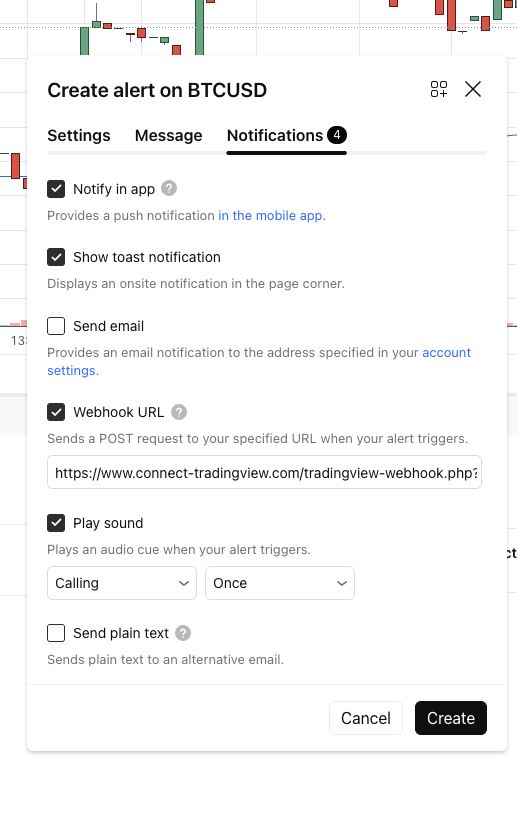
Configuring webhook URL in TradingView
Test Your Alert
You can test your webhook connection using the test tool in the client portal or by manually sending a request:
curl -X POST https://yourdomain.com/tradingview-webhook.php?api_key=YOUR_API_KEY \
  -H "Content-Type: application/json" \
-d '{"action":"buy","symbol":"EURUSD","price":1.0850,"volume":0.1}'JSON Message Format
TradingView alerts should send JSON-formatted messages. Below are the supported fields and formats.
Basic Order Fields
| Field | Required | Description | Example |
|---|---|---|---|
| webhook_id | Yes | Signal Authentication | "28467515" |
| action | Yes | Trade action: buy, sell, closelong, closeshort | "buy" |
| symbol | Yes | Symbol to trade | "EURUSD" |
| price | No | Entry price (market order if omitted) | 1.0850 |
| volume | No* | Trade volume (default: 0.1) | 0.1 |
| sl | No | Stop loss price | 1.0800 |
| tp | No | Take profit price | 1.0900 |
| comment | No | Order comment | "EMA crossover" |
| magic | No | Magic number for order identification | 12345 |
* Volume is required for buy/sell actions, not for close actions. Default is 0.1 if not specified.
Buy Order Example
{
    "webhook_id": "5039858790",
    "action": "buy",
    "symbol": "EURUSD",
    "price": "{{close}}",
    "volume": 0.1,
    "sl": 1.0800,
    "tp": 1.0900,
    "comment": "EMA crossover buy",
    "magic": 12345
}Sell Order Example
{
    "webhook_id": "5039858790",
    "action": "sell",
    "symbol": "EURUSD",
    "price": "{{close}}",
    "volume": 0.1,
    "sl": 1.0900,
    "tp": 1.0800,
    "comment": "Overbought sell",
    "magic": 12345
}TradingView Pine Script Syntax
Below is an example Pine Script strategy that can be used with the webhook bridge.
//@version=5
strategy("MT5 Webhook Strategy", overlay=true, margin_long=100, margin_short=100)

// Input parameters
webhook_id = input.string("your_api_key", title="Webhook ID")
fast_length = input(title="Fast MA Length", defval=20)
slow_length = input(title="Slow MA Length", defval=60)

// Calculate indicators
fast_ma = ta.sma(close, fast_length)
slow_ma = ta.sma(close, slow_length)

// Trading logic
long_condition = ta.crossover(fast_ma, slow_ma)
short_condition = ta.crossunder(fast_ma, slow_ma)

if (long_condition)
    strategy.entry("Long", strategy.long)
    alert_message = '{ "webhook_id": "' + your_api_key + '", "action": "buy", "symbol": "' + syminfo.ticker + '", "price": "' + str.tostring(close) + '", "volume": 0.1, "magic": 12345 }'
    alert(alert_message, alert.freq_once_per_bar_close)

if (short_condition)
    strategy.entry("Short", strategy.short)
    alert_message = '{ "webhook_id": "' + your_api_key + '", "action": "sell", "symbol": "' + syminfo.ticker + '", "price": "' + str.tostring(close) + '", "volume": 0.1, "magic": 12345 }'
    alert(alert_message, alert.freq_once_per_bar_close)

// Plot indicators
plot(fast_ma, color=color.blue, linewidth=2)
plot(slow_ma, color=color.red, linewidth=2)Full TradingView Syntax (Buy - Sell - CloseLong - CloseShort) Send Test Alert
//@version=6
strategy("Connect-Tradingview Settings", overlay=true)


var pc_risk = 0.0
var comment = 0.0
var magic = 0.0
var price = 0.0

var longStop = 0.0
var longTarget = 0.0
var shortStop =0.0
var shortTarget = 0.0


// Connect-Tradingview Settings
pc_prefix = input.string(title = 'MetaTrader Prefix', defval = '', group = 'Connect-Tradingview Settings', tooltip = 'This is your broker\'s MetaTrader symbol prefix')
pc_suffix = input.string(title = 'MetaTrader Suffix', defval = '', group = 'Connect-Tradingview Settings', tooltip = 'This is your broker\'s MetaTrader symbol suffix')

// Generate Connect-Tradingview alert string
var symbol = pc_prefix + syminfo.ticker + pc_suffix


pc_entry_alert(direction, price, sl, tp, risk, comment) =>
     '{"webhook_id":41183075121,"action":"' + direction + '" , "symbol": "' + syminfo.ticker + '", "price": ' + str.tostring(close) + ', "sl": ' + str.tostring(sl) + ', "tp": ' + str.tostring(tp) + ', "volume": ' + str.tostring(risk) + ', "magic": ' + str.tostring(timeframe.period) +', "comment": "2vSuperTrend' + str.tostring(timeframe.period) + '_' + str.tostring(lab_1) + '", "strategy": "2vSuperTrend"}'


//============================= Conditions ======================================================================================
longCondition = close > 0.0
shortCondition = close < 0

//===============================long And Short Implementing======================================================================
if longCondition

    pc_risk := 3.50
    longStop := close - syminfo.mintick * 20000
    longTarget := close + syminfo.mintick * 50 //250
    alert_string = pc_entry_alert('buy', price, longStop, longTarget, pc_risk, comment)
    alert(alert_string, alert.freq_once_per_bar_close)
    strategy.entry('Long', strategy.long, qty = 350000)


if shortCondition

    pc_risk := 3.50
    shortStop := close + syminfo.mintick * 20000
    shortTarget := close - syminfo.mintick * 50 //250
    alert_string = pc_entry_alert('sell', price, shortStop, shortTarget, pc_risk, comment)
    alert(alert_string, alert.freq_once_per_bar_close)
    strategy.entry('Short', strategy.short, qty = 350000)


//===================== CLOSE Long And Short Implementing ===========================================================================
var symbol_1 = pc_prefix + syminfo.ticker + pc_suffix


pc_entry_alert_1(direction, magic) =>
    '{"webhook_id":25544074331, "action":"' + direction + '" , "symbol": "' + syminfo.ticker + '", "magic": ' + str.tostring(timeframe.period) +'}'


//Your CloseShort Conditions And CloseLong Conditions

if close > 0.0
    alert_string = pc_entry_alert_1('closelong', magic)
    alert(alert_string, alert.freq_once_per_bar_close)
    strategy.close('Long')


if close < 0.0
    alert_string = pc_entry_alert_1('closeshort', magic )
    alert(alert_string, alert.freq_once_per_bar_close)
    strategy.close('Short')

//======================================================
strategy.exit(id = 'Long Exit', from_entry = 'Long', limit = longTarget, stop = longStop)
strategy.exit(id = 'Short Exit', from_entry = 'Short', limit = shortTarget, stop = shortStop)
Close long Positions Script Filter By Magic Number
//@version=5
strategy("Close long Positions", overlay=true)

// Input parameter
closeLong = input.bool(false, title="Close long Positions")

if (closeLong)
    alert_message = '{"webhook_id":25544074331, "action":"closelong" , "symbol": "' + syminfo.ticker + '", "magic": ' + str.tostring(timeframe.period) +'}'
    alert(alert_message, alert.freq_once_per_bar_close)
Close short Positions Script Filter By Magic Number
//@version=5
strategy("Close short Positions", overlay=true)

// Input parameter
closeShort = input.bool(false, title="Close Short Positions")

if (closeShort)
    alert_message = '{ "webhook_id":25544074331, "action":"closeshort" , "symbol": "' + syminfo.ticker + '", "magic": ' + str.tostring(timeframe.period) +'}'
    strategy.close_all()
alert(alert_message, alert.freq_once_per_bar_close)MT5 Expert Advisor
MT5 Expert Advisor (EA)
Version: 4.1.3 | Format: EX5
This EA must be installed in your MetaTrader 5 platform to receive TradingView alerts.
Secure direct download with no pop-ups
Secure download: Your files are protected through our encrypted connection.
Configure MT5 to Allow WebRequests
Before using the webhook bridge, you need to configure MT5 to allow web requests to the bridge URL.
Steps:
- Open MT5 and go to Tools → Options
- Select the Expert Advisors tab
- Check "Allow WebRequest for listed URL"
- Add the following URL to the list:
https://www.connect-tradingview.com/tradingview-webhook.php - Click OK to save the settings
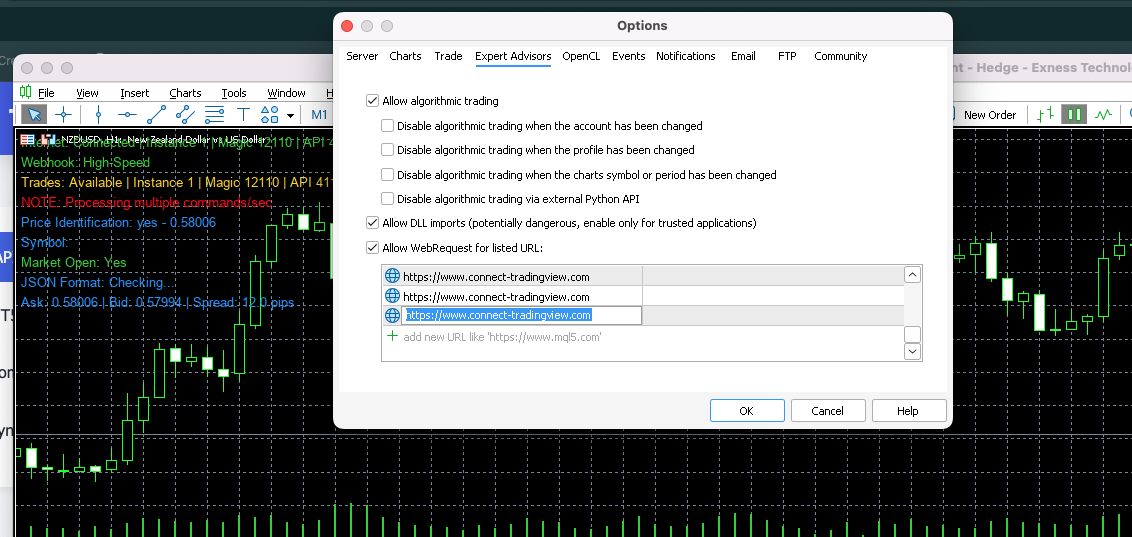
MT5 Options showing WebRequest configuration
MT5 EA Configuration
The Expert Advisor (EA) in MT5 needs to be configured with the following parameters to work with the webhook bridge.
MT5 EA Input Parameters
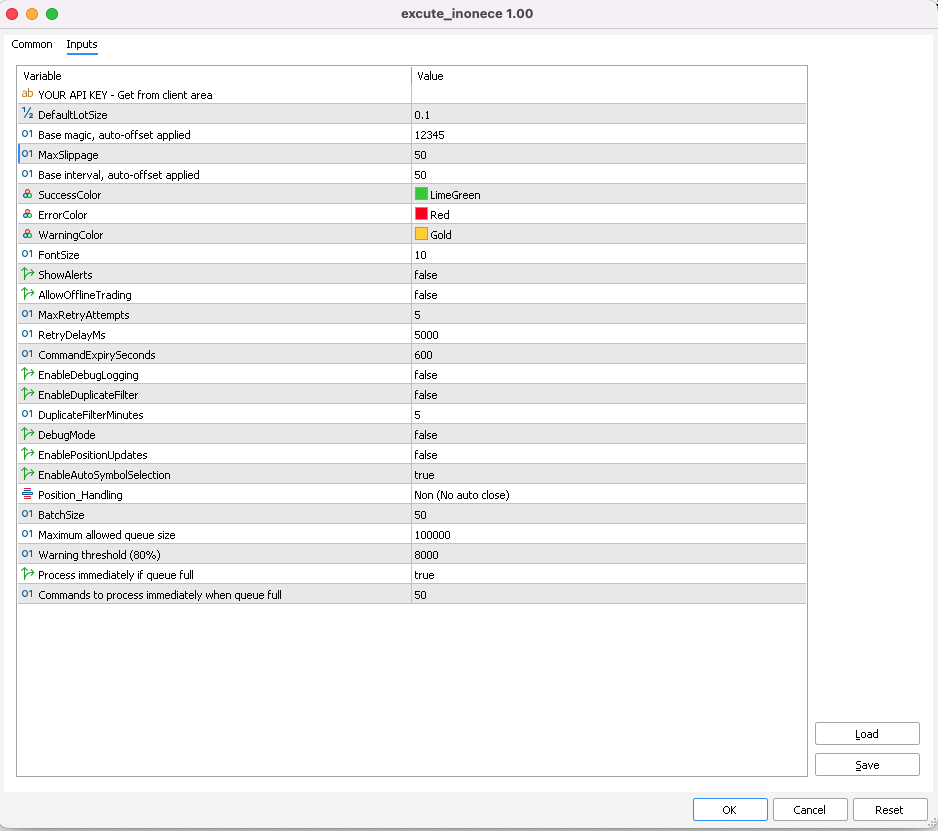
MT5 Expert Advisor configuration panel showing input parameters
Configuration Parameters
| Parameter | Description | Default |
|---|---|---|
| API_Key | Your unique API key for authentication with the webhook service | YOUR_API_KEY_HERE |
| DefaultVolume | Default trade volume when not specified in the signal | 0.1 |
| MagicNumber | Unique identifier for orders managed by this EA. Used to filter orders for closing and modification. | 12345 |
| PositionHandling |
CLOSE_IN_PROFIT: Closes only profitable positions with same open currency name when a new same signal comes that in
CLOSE_OPPOSITE: Closes opposite position with same currency name when a new signal comes in for the same currencyNO_AUTO_CLOSE: No automatic position closing EA will accept all signals |
NO_AUTO_CLOSE |
| EnableAutoSymbolSelection | When enabled, the EA will automatically detect the chart symbol instead of requiring attachment to all symbols | true |
Key Features
API Key Authentication
Secure authentication using your unique API key to prevent unauthorized access to your trading account.
Magic Number Filtering
Use magic numbers to identify and manage specific groups of orders, making position handling more precise.
Flexible Position Handling
Choose how the EA handles opposite positions: close only if profitable, always close, or manual management.
Auto Symbol Selection
The EA automatically detects symbols from webhook signals, eliminating the need to attach it to every chart.
Pro Tip
Use TradingView's built-in variables like {{ticker}}, {{close}}, and {{interval}} to make your alerts dynamic and responsive to market conditions.